
CABLE TRAYS
ORGANIZED. PROTECTED. BUILT FOR EVERY PROJECT
Premium cable trays designed for safe, organized, and efficient cable routing in commercial, industrial, and residential environments.
Frequently Asked Questions
What are cable trays used for?
Cable trays are used to support, organize, and protect electrical cables, network cables, and communication wiring in different installation environments. They provide a structured pathway that keeps cables properly arranged, improves accessibility for maintenance, and helps reduce cable clutter.
Cable trays are commonly used in commercial buildings, industrial facilities, data centers, offices, solar installations, server rooms, and electrical infrastructure projects where safe and efficient cable routing is required.
What are the different types of cable trays?
Cable trays are available in several designs to meet different cable management requirements. Ladder cable trays are commonly used for heavy cable loads and large electrical installations, while perforated cable trays provide support and ventilation for general power and data cables. Wire mesh cable trays offer flexible installation options and easy cable access, whereas solid-bottom cable trays provide additional protection for cables in environments where extra coverage is needed.
The right cable tray depends on factors such as cable quantity, installation location, load capacity, ventilation requirements, and accessibility needs. Selecting the correct type helps ensure a safer, cleaner, and more efficient cable management system.
How do I install a cable management tray?
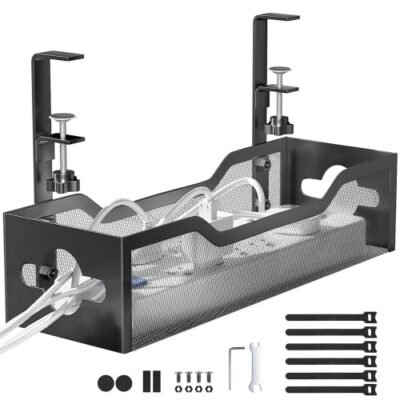
Mark the mounting position centrally under the desk, approximately 6 inches from the back edge. Drill pilot holes (for screw mount) or apply the included adhesive brackets. Attach the tray with the screws or clips provided. Load your power strip and thread cables in through the ends or side openings. The whole installation typically takes under 15 minutes.
How much weight can an under-desk cable tray hold?
Most under-desk cable trays are rated to hold 11–22 lbs (5–10 kg) — more than enough for a standard power strip, multiple adapters, and a full cable bundle. Screw-mount trays hold significantly more than adhesive-mount versions. Check the product specifications for the exact weight rating.
Will a cable tray damage my desk?
Screw-mount trays leave small screw holes in the desk underside. Clamp-mount trays leave no marks at all. Adhesive-mount trays use strong tape that may leave residue if removed. For rental properties or premium desks, use clamp-mount versions.