
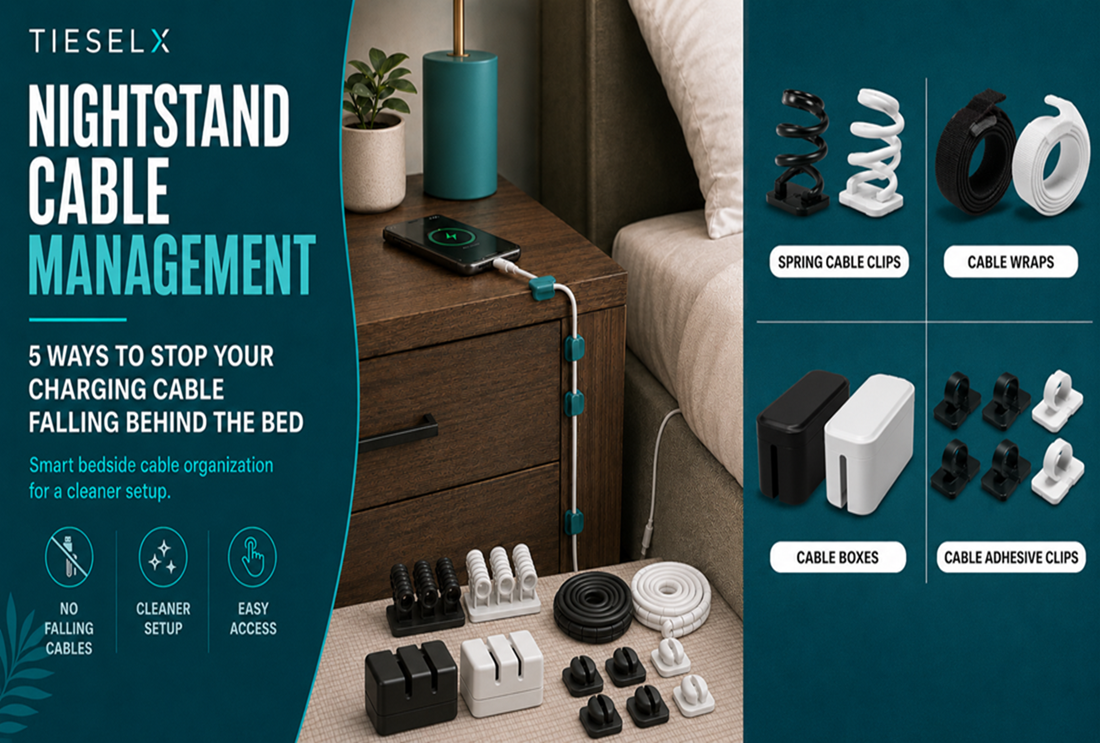
It happens every night. You reach for your phone charger in the dark and it’s gone — fallen behind the nightstand again. You have to get up, drag the nightstand away from the wall, and fish the cable out from the dusty gap. Then it happens again the next morning.
This is one of the most easily solved cable problems in any home, and it takes less than five minutes to fix permanently. Here are five methods that actually work, from the simplest one-clip solution to a complete nightstand cable organisation overhaul.
Method 1: Spring Cable Clip on the Nightstand Edge (The Best Solution)
The single most effective nightstand cable fix costs less than $2 per cable and takes thirty seconds to install. A spring cable clip mounts on the top edge or face of the nightstand, holds the charging cable end in a fixed position, and releases in under a second when you want to plug in your phone.
Why this works: The cable tip always stays at exactly the same height and position. Reach for it in complete darkness — it’s exactly where you left it. No more searching behind furniture. When you unplug in the morning, the cable snaps back into the clip automatically.
Installation:
- Clean the mounting spot with a dry cloth.
- Peel the adhesive backing and press the clip firmly onto the nightstand edge for 15 seconds.
- Wait 30 minutes for the adhesive to cure.
- Thread your charging cable into the clip — press the spring, drop the cable in, release.
TIESELX Spring Cable Clips accommodate cables 2.5–8mm in diameter (USB-C, Lightning, Micro-USB all fit). The premium acrylic adhesive leaves no residue when removed. Choose White for light wood nightstands, Black for dark furniture, or Clear for an almost-invisible result. Available in 6-pack, 8-pack and 12-pack — the 6-pack is ideal for a single nightstand.
Method 2: Fixed Adhesive Cable Clips Along the Back Edge
If you have multiple cables (phone charger, tablet charger, lamp, reading light) running from the nightstand to the wall socket, route them with fixed adhesive cable clips along the back edge of the nightstand surface and down the leg or side panel.
Space the clips every 12–15 inches along the route. This keeps all cables flush against the nightstand and prevents the “waterfall of cables” look behind the furniture. Once the cables are clipped, they can’t fall anywhere — they travel a fixed path from the socket to the nightstand surface in a clean, controlled run.
Method 3: Velcro Cable Strap to Bundle Charging Cables
If you have two or three charging cables running to the same nightstand — a common scenario in shared bedrooms — bundle them together with hook and loop cable straps. Bundle them loosely (don’t pull tight — cables need room for a natural bend) and the whole group travels together rather than spreading out and creating individual strays.
This works particularly well combined with Method 1: bundle the cables together along the back run, then separate them at the nightstand edge where each one goes into its own spring clip at the front.
Method 4: Cable Box on the Nightstand
If your nightstand has enough surface space and you have multiple chargers and a power strip, a cable management box conceals the entire charging hub in one neat enclosure. The power strip and adapters sit inside the box; only the cable tips emerge through the entry holes.
This is the cleanest visual solution and the most appropriate if you charge multiple devices overnight — phone, earbuds, smartwatch, tablet. The box acts as the central charging hub and everything routes to it from a single tidy pile rather than multiple cables running in different directions.
Method 5: Headboard Cable Channel
For bedframes with a headboard, a cable raceway along the back of the headboard routes cables invisibly from the wall socket up and along the headboard to both sides of the bed. Each side gets its own charging cable terminal — no cables trailing down the wall or across the floor.
This is the premium solution for a completely cable-free bedroom floor and nightstand. Pair it with spring clips at each side of the headboard for accessible phone and tablet charging positions.
What About Wireless Charging Pads?
Wireless charging pads still have a power cable — they just eliminate the cable between pad and phone. If you use a wireless charger, you still need to route the pad’s power cable neatly to the socket. Use a single spring cable clip to hold the pad’s cable at the nightstand edge, or a fixed clip to route it down the nightstand leg. The same methods above apply.
Recommended Products for Nightstand Cable Management
- TIESELX Spring Cable Clips — Best for keeping charging cable tips accessible at the nightstand edge. 6-pack is ideal for 1–2 nightstands.
- TIESELX 60-Pack Adhesive Clips — Best for routing cable runs along the nightstand back and down the legs.
- Hook and Loop Cable Straps — Best for bundling multiple cables along the back run.
- Browse the full cable management range →
Browse more cable clips.